
Reviews Ubiquiti UniFi AP U7 Pro
Interested in reviews of Ubiquiti UniFi AP U7 Pro? It got 4.9 out of 5 stars from our customers. Find specific customer reviews of Ubiquiti UniFi AP U7 Pro below. We will appreciate if you also share your experiences with Ubiquiti UniFi AP U7 Pro after purchasing.
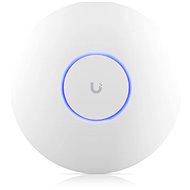
Ubiquiti UniFi AP U7 Pro
In stock > 5 pcs
192.90 €
Add to Cart

Milan, Chomutov 1
Rated 13/03/2026, variant Ubiquiti UniFi AP U7 Pro
Verified purchase
The installation was quite an experience. First I bought a bad PoE power supply. Prestoze was from the same company and met the same specification, it was only 24V and not 48V. Installation via android app was a complete horror. The AP required a software update as a first step. Well, the one that dropped a few percent. Over and over again. On about 20 attempts it all caught up 30 minutes later. Just to learn that the android app is a complete piece of sh***. You buy an AP for 5k and the app lets you change the SSD, password, encryption type and channel width. That's about it. The mobile app is simply a scam. So if you don't have anything from Ubiquity, get ready to install their server. Their latest Ubiquity OS requires at least 10GB of free disk space, so if you have your Raspberry Pi with a 32GB card a bit full, forget it. For God's sake, why do I need 10GB of space for software that I just want to let me set up VLANs on the APck. Fortunately, you can still install the older Ubiquity Network Server, which does not have such absurd requirements. But not now from the official website. Their Debian repository is underwritten by clients whose encryption type is already deprecated. Once you get around this, you run into another blocker problem. I don't know exactly what it was. Anyway, their official site will eventually link you to a community install script maintained by someone. He's already paid the panbuh. Once you get their server up and running, then it's one and done. So somehow I couldn't get over the fact that in order to log into the self-hosted administration I have to create an online Ubiquity account. Well, I guess it's just the way it is. Of course, remote access to administration is enabled by default, for them, right? That's what you want. The installation was a horror for me and I am used to a lot of things from Mikrotik. Well, I'm not just gonna be slanderous. Administration, control, settings - everything is easy to understand for IT shovels. Setting different VLANs to different SSIDs. All parade. Transmission speed? Spike. Both in my notebook with Wifi 7 and in the other with Wifi 6E, the transfer speed in my 1+KK is limited by 1Gb/s - more than that is not possible with Ethernet. I am completely satisfied. That's what I wanted. In comparison with Mikrotik hAP ax³ the speed is stable, about double and on Windows disappeared such cheerful problems that the laptop connected to Wifi 5 and not to Wifi 6 no matter what. I would have returned the AP after the initial troubles with installation and setup, but in short Ubiquity probably has no competition in terms of radio quality in this price range. Doing a new installation on a house with a garden, so I'll build everything on AP from them. And as soon as I close their self-hosted server in the docker, I'll probably be really happy. PS: If after reading you don't know which one beats or you don't already own their gateway from Ubiquity, definitely don't buy this AP. It's not difficult to get it up and running, but it's not self-executing and you need a server.
transfer speed on wifi 6 and 7
strength signals
appearance
PoE
user friendly interface administration (compare with Mikrotik)
completely unusable mobile application
it is necessary to own their gateway or self-host their server application
you need to create an account with ubiquity
the backlight control does not work - but at least it can be switched off completely
0 ×Report
Automatic translation

Matěj, České Budějovice
Rated 26/01/2026, variant Ubiquiti UniFi AP U7 Pro
Verified purchase
Super
Don't forget to buy a POE++ adapter
0 ×Report
Automatic translation

Customer, Pardubice
Rated 26/12/2025, variant Ubiquiti UniFi AP U7 Pro
Verified purchase
Work as described, teh installation and setup process was pretty simple
0 ×Report

Kamil, Kralupy nad Vltavou
Rated 21/07/2025, variant Ubiquiti UniFi AP U7 Pro
Verified purchase - review from a price comparison website
High-performance, long-range ceiling unit
PoE power supply
Absolutely trouble-free and reliable operation
It is possible to create a network even for IoT devices
Stable WiFi connection for dozens of clients
0 ×Report
Automatic translation

Company
Rated 19/04/2025, variant Ubiquiti UniFi AP U7 Pro
Verified purchase
100% functional
Transfer rate 1:1
Range is limited
Cannot be activated without internet
0 ×Report
Automatic translation

Vladimír, Praha
Rated 08/01/2025, variant Ubiquiti UniFi AP U7 Pro
Verified purchase
Connected only 1GE, but speed on iPhone 16 PRO about 4m from AP is 890Mbps real download from local server.
WOW effect: D
Installation material
Design
Price
Slightly hot (understandable given the performance)
For some, it may be a problem that it is without a PoE+ injector. (Otherwise, it has PoE+ and the Unifi switch with PoE can handle it just fine.
0 ×Report
Automatic translation
Johana, Praha
Rated 17/11/2024, variant Ubiquiti UniFi AP U7 Pro
Verified purchase
Very fast Wifi 7 and 6E at 6 GHz
PoE power supply
Overall quality product
0 ×Report
Automatic translation
Company
Rated 19/10/2024, variant Ubiquiti UniFi AP U7 Pro
Verified purchase
Coverage and speed are high and stable
Quality design - compared to Ubiquiti Express another level
The administration environment is clear and the mobile app is easy to use
6Ghz frequency will ensure future usefulness
A little more complicated initial setup because the server for administration must be running on the same network as the router. This is especially complicated by the fact that the wifi router has no output connection to connect to the same network.
For example, in my case, due to the point mentioned above + the fact that my ISP only allows one "input device", it is defacto physically impossible to connect to the same network, as this wifi router has no output. Eventually solved by getting a "switch" (in this case a router (something other than a wifi router) - as the switch was not seen as a separate "device" in terms of the network) to connect the laptop and wifi router to the same network. I also then created a hotspot from this laptop to connect the UniFi mobile app to the same network on my phone where the setup is easier. However, this process could easily be replaced by plugging this wifi router into an existing router and setting up the device over the existing wifi network, but that was not an option for me.
A little bit leaner administration and e.g. compared to the cheaper express, probably trying to push the customer into buying as many products in the ecosystem as possible.
Need to buy POE injector - additional expenses
0 ×Report
Automatic translation
Pavel, Havířov - Dolní Suchá
Rated 08/10/2024, variant Ubiquiti UniFi AP U7 Pro
Verified purchase - review from a price comparison website
Excellent signal coverage
0 ×Report
Automatic translation

Customer, Praha 6 - Břevnov
Rated 23/07/2024, variant Ubiquiti UniFi AP U7 Pro
Verified purchase
Tento přístupový bod funguje opravdu dobře
nic zvláštního
0 ×Report