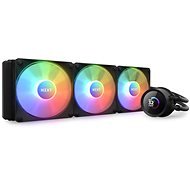
Interested in reviews of NZXT KRAKEN 360 RGB? It got 4.7 out of 5 stars from our customers. Find specific customer reviews of NZXT KRAKEN 360 RGB below. We will appreciate if you also share your experiences with NZXT KRAKEN 360 RGB after purchasing.
Higher price (it was really worth the beauty and cooling)
0 ×Report
Automatic translation
Jakub, Česká Třebová 2
Rated 25/08/2025, variant NZXT KRAKEN 360 RGB
Verified purchase
Parade
0 ×Report
Automatic translation
Jakub, PLZEŇ
Rated 19/08/2025, variant NZXT KRAKEN 360 RGB
Verified purchase
The first water cooling, and I must say it was quite a surprise.
RGB hub (with program! )
0 ×Report
Automatic translation
Anonymous customer
Rated 26/09/2024, variant NZXT KRAKEN 360 RGB
Verified purchase
appearance
Cool
0 ×Report
Automatic translation
Customer, Příbram 1
Rated 03/10/2023, variant NZXT KRAKEN 360 RGB
Verified purchase - review from a price comparison website
price
0 ×Report
Automatic translation
Martin, Litvínov
Rated 29/07/2023, variant NZXT KRAKEN 360 RGB
Verified purchase
I had a Kraken X53 before and this version is a bit better again. The display can already be modified in various ways, GIFs, pictures, temperatures can be inserted.
Cools most processors
Easy installation
AM5 processor support
RGB Hub
NZXT Cam
The display is full screen only on the Elite version, but at least it shows CPU/GPU temperatures and other conveniences.
0 ×Report
Automatic translation
Michal, Líbeznice
Rated 11/01/2026, variant NZXT KRAKEN 240
Verified purchase - review from a price comparison website
Compared to the old AIO from Corsair, it is completely inaudible. You can't tell that the PC is running at all. Total satisfaction.
Beautifully quiet
Easy installation
Applied paste
Some may be confused by the amount of wiring at the beginning, but I had no problem with it.
0 ×Report
Automatic translation
Jan, Hlavenec
Rated 23/11/2025, variant NZXT KRAKEN 240
Verified purchase
The assembly was relatively simple and the instructions were sufficiently foolproof. I have no doubt about the qualities of the hot conductive paste. but I put in a different one that I've had for years. When I first started it, I was quite surprised because the pump was running at full speed and the whistling was unbearable (like a stationary subway in a depot). Fortunately, after adjusting the curves for the fans, pump and reboot, it came together beautifully. It definitely takes a bit of playing around with it and finding a reasonable balance. The software was a pleasant surprise, it is very easy and easy to set almost everything, from CPU temperature indicators, GPU temperature, load or coolant temperature. And of course I must not forget the popular GIFs. I put in Joseph Lada's The Hound in Winter for fun. However, after various adjustments I decided to give it a proper boiler, I turned on everything in OCCT (CPU, GPU, RAM. ) and the CPU temperature was 80°c towards the end, which is excellent (I will never be so busy in my life that I will get to a higher temperature). When playing e.g. Battlefield 6 temperature does not exceed 70°c and right under the pump is RX9070XT, which can heat up nicely.
Temperatures 42-75°C with Ryzen 7800X3D
Easy installation
Quality of workmanship
Applied paste
Clear display
Well developed software
Need to plug the cable into the USB socket on the board and SATA power supply, other AiOs can be connected without it
Higher price outside the event
0 ×Report
Automatic translation
Zdeněk, Zábřeh na Moravě Jestřebí 29
Rated 14/11/2025, variant NZXT KRAKEN 360
Verified purchase
It'll keep the 9950x3d cool
temperature display
0 ×Report
Automatic translation
Miroslav, Praha 7
Rated 07/11/2025, variant NZXT KRAKEN 240
Verified purchase
Installed on AMD TDP 65W. so far the temperature has not exceeded 35 degrees, so the purpose is fulfilled and probably oversized: -), for assembly it's best to find the youtube tutorial, it was a piece of cake, the instructions a bit incomprehensible or I'm not the sharpest pencil in the pencil.
Probably too cool for my needs
Processor temperature up to 35 degrees
Thermal conductive paste applied
Decent appearance
Simple motage on AM5
0 ×Report
Automatic translation
Try our cookies
Alza.cz a. s., Company identification number 27082440, uses cookies to ensure the functionality of the website and with your consent also to personalisage the content of our website. By clicking on the “I understand“ button, you agree to the use of cookies and the transfer of data regarding the behavior on the website for displaying targeted advertising on social networks and advertising networks on other websites.