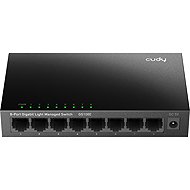
Interested in reviews of CUDY 8-Port Gigabit Light Managed Switch? It got 3.2 out of 5 stars from our customers. Find specific customer reviews of CUDY 8-Port Gigabit Light Managed Switch below. We will appreciate if you also share your experiences with CUDY 8-Port Gigabit Light Managed Switch after purchasing.
First of all - the user who wrote the review here before me (and some others on foreign discussion forums) is wrong: the set IP address is remembered by this switch. Probably there was a misunderstanding - after the change it is not enough to click on "apply", it is necessary to save the configuration using "Save".
What is striking is the lack of a reset element (or I'm looking wrong). If I imagine that, for example, a user forgets the password to the administrator account or manages to set up a VLAN so that the interface is unavailable from all ports. Apparently, it is assumed that with the low price, they will buy a new piece: -) Or I really don't know.
On the table for various tests good when we need a 1Gbps switch. And for the money.
Price,
metal design, no plastic box.,
VLAN support (although probably not 100% implemented),
the configuration interface is also available via https (but you have to accept a self-signed certificate, valid until 2032).
Is there any element missing that could be used to do a factory reset (? ),
last firmware upgrade from December 2024,
configuration interface available only in VLAN 1 - cannot be configured in any way (? ),
the manual on the manufacturer's website is very brief,
little experience on the user side, few reviews, etc.
The quality corresponds to the price. By default it has ip 192.168.2.1. It is possible to set the ip address to your fix or let it take it from the dhcp server. After changing the default ip it works until reboot/unplug. Then it sets itself again to 192.168.2.1. It's useless.
are not
does not keep the set ip address
0 ×Report
Automatic translation
Try our cookies
Alza.cz a. s., Company identification number 27082440, use cookies and other data to ensure the proper functioning of the website and, with your consent, also, among other things, to personalize advertising and the content of our websites. By clicking on the “I understand“ button, you agree to the use of cookies and the transfer of data regarding the behavior on the website for displaying targeted advertising on social networks and advertising networks on other websites.