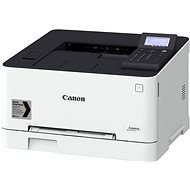
Sind Sie interessiert an Bewertungen und Rezensionen zu Canon i-SENSYS LBP623Cdw? Zu 4,8 haben wir bisher eine Bewertung von 5 Sternen von 12 Benutzern. Unten auf dieser Seite finden Sie die spezifischen Erfahrungen anderer Kunden mit Canon i-SENSYS LBP623Cdw. Wir freuen uns jedoch, wenn Sie uns nach dem Kauf eine Punktzahl zu Canon i-SENSYS LBP623Cdw schreiben.
Bewertet am 04.12.2021, Variante Canon i-SENSYS LBP623Cdw
Verifizierter Kauf
Drucken von android
Extrem schnelle Inbetriebnahme auf Anhieb
Qualität auf Paradefahrt
Wifi-Verbindung
0 ×Melden
Automatische Übersetzung
Tomáš, Bratislava
Bewertet am 01.12.2021, Variante Canon i-SENSYS LBP623Cdw
gutes Preis-/Leistungsverhältnis
ausreichende Qualität für den Hausdruck
WiFi-Verbindung, keine Notwendigkeit, das Kabel zu ziehen
automatischer Duplexdruck
das Papier- und Tonerfach ist von vorne zugänglich und kann im verschlossenen Fach aufbewahrt werden
das Display ist in einem bestimmten Winkel fixiert, es kann nicht geklappt werden
die offizielle Canon-App hat oft Probleme, den Drucker über WiFi zu finden, aber die Mopria-App funktioniert 100%ig, ich empfehle sie hier zu benutzen
0 ×Melden
Automatische Übersetzung
Jaroslav, Praha 10
Bewertet am 27.11.2021, Variante Canon i-SENSYS LBP623Cdw
Verifizierter Kauf
Stellen Sie sicher, dass Sie den installierten Canon Treiber zum Drucken verwenden. Wenn Sie einen Treiber verwenden, den Windows kurz nach der Erkennung des Druckers im Netzwerk zum Drucken installiert, fragt der Drucker vor dem Drucken immer nach dem zu verwendenden Papierfach und Sie müssen dies manuell bestätigen. Wenn Sie nicht wissen, welchen der drei Canon-Treiber Sie verwenden sollen, empfehle ich PostScript (PS3-Druckertreiber). Der Drucker sollte dabei die beste Farbwiedergabe haben.
Nahtlose Installation direkt über WiFi
Nahtloses Drucken über WiFi von einem Win 10 PC und einem Android-Telefon
Die Druckqualität, die Sie von einem Laserdrucker erwarten
Beidseitiger Druck möglich
Ein großes Papierfach und ein zweites Fach für die manuelle Zuführung von weniger häufig verwendeten Papierformaten. Es besteht keine Notwendigkeit für z.B. Entnahme von Papier aus dem großen Fach beim Bedrucken eines Briefumschlags.
0 ×Melden
Automatische Übersetzung
Vojtěch, Praha
Bewertet am 10.04.2021, Variante Canon i-SENSYS LBP623Cdw
Verifizierter Kauf
Nach dem Hochfahren und der Verbindung mit dem heimischen WiFi fanden alle mobilen Geräte (Android/iOS) sie sofort
Nahtloser Druck
Nahtlose Installation und Steuerung nach Installation der entsprechenden Treiber auf dem PC
Druckt hervorragend (auf Papier der entsprechenden Qualität)
0 ×Melden
Automatische Übersetzung
Česká obec sokolská, odbor sportu, Praha 1 - Malá Strana
Bewertet am 08.10.2020, Variante Canon i-SENSYS LBP623Cdw
Verifizierter Kauf
Viele Funktionen, schönes Design
Der IT-Spezialist ist nicht in der Lage, es richtig zu installieren, aber das ist nicht die Schuld des Produkts.
0 ×Melden
Automatische Übersetzung
Petr, Řitka
Bewertet am 18.07.2020, Variante Canon i-SENSYS LBP623Cdw
Verifizierter Kauf
Druckqualität
Druckgeschwindigkeit
automatischer Duplexdruck
komplexere Einstellungen für den Laien
automatisches Herunterfahren anstelle des Ruhezustands (kann außer Kraft gesetzt werden)
0 ×Melden
Automatische Übersetzung
Jan, Stonařov
Bewertet am 17.06.2020, Variante Canon i-SENSYS LBP623Cdw
Verifizierter Kauf
Es funktioniert
Gedruckt von
0 ×Melden
Automatische Übersetzung
Miroslav, Bratislava
Bewertet am 23.04.2020, Variante Canon i-SENSYS LBP623Cdw
Verifizierter Kauf
wifi direct funktioniert nach der Ersteinrichtung auch ohne WIFI, aber der Netzwerktyp darf nicht auf Wireless LAN, sondern auf Wired LAN eingestellt sein, denn nur so wird der von wifi direct Hot Spot erstellte Drucker nicht bekämpft
leise nach dem Einschalten, schneller Erstdruck, individuell über IP einrichtbar
das Fach ist verdeckt, es läuft nicht über Papier und in den Drucker hinein
automatisch duplex
0 ×Melden
Automatische Übersetzung
Probieren Sie unsere Cookies
Wir, die Firma Alza.cz a.s. verwenden Cookies und weitere Daten, um die Funktionsfähigkeit der Website sicherzustellen sowie mit Ihrer Einwilligung unter anderem zur Personalisierung von Werbung und den Inhalten unserer Webseiten. Durch Klicken auf die Schaltfläche "Ich verstehe" stimmen Sie der Verwendung von Cookies zu diesen Zwecken und der Übertragung von über diese Cookies ermittelten Nutzungsdaten dieser Website an unsere Partner für die Anzeige gezielter Werbung in sozialen Netzwerken und Werbenetzwerken auf anderen Websites zu. Diese Zustimmung ist freiwillig und kann jederzeit widerrufen werden. Weitere Informationen zu den verwendeten Cookies, zu Ihren Rechten und zu unseren Partnern sowie die Möglichkeit, der Verwendung von Cookies nicht oder nur teilweise zuzustimmen, finden Sie unter dem Link „Detaillierte Einstellungen“.