
Reviews Bosch BCRDW3BX Spotless Max Cam
Interested in reviews of Bosch BCRDW3BX Spotless Max Cam? It got 4.7 out of 5 stars from our customers. Find specific customer reviews of Bosch BCRDW3BX Spotless Max Cam below. We will appreciate if you also share your experiences with Bosch BCRDW3BX Spotless Max Cam after purchasing.
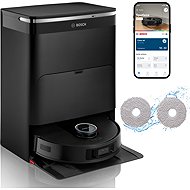
Bosch BCRDW3BX Spotless Max Cam
In stock > 5 pcs
948.90 €
Add to Cart

Jan, Praha
Rated 11/10/2026, variant Bosch BCRDW3BX Spotless Max Cam
Verified purchase
For my first experience with a robot vacuum, it's not bad. The vacuum was carefully packaged and assembling the docking station was more than simple. Following the instructions, the vacuum connects via the Home Connect app, which is reliable to a certain extent, but not perfect. Once the vacuum is paired with the app via WiFi, it creates an initial map in which it will navigate. Mapping must be started exclusively from the docking station. If you start mapping away from it, for example in another room, the vacuum will map successfully, but after completing the task, it will return to where it started. In none of the three test cases could it find and recognise the docking station. Similarly, even when it passed by it, it didn't include it in the map being created. The robot is relatively quiet on hard floors, but occasionally you can hear rattling sounds from the plastic moving parts of the vacuum. When it moves onto a carpet, it recognises the change in surface and increases the suction power, which is still relatively quiet. So, the vacuum can easily operate at night.
The flip-out mop works very well; it gets into corners without any problems. It doesn't leave puddles. With plain water, it only mops up very minor dirt from the floor. To get rid of tougher dirt, you need to buy a compatible cleaning solution (BOSCH BHZRCD), which can tackle things like dried-on food and drink stains. The docking station does not have a separate tank for the cleaning solution. You have to mix it in the correct ratio with water in the clean water tank.
During vacuuming and mopping on Eco mode, the robot's battery only went from 100% down to 72% in 1.5 hours of work, which is excellent. You need to bear in mind that it takes frequent service breaks to swap dirty water for clean and to empty the dustbin. So, if it's a long way from the docking station, it takes a while to get there and then to return to where it left off. A couple of times, the robot got a bit lost on its way back and 'wandered around', but it always managed to get back to the original spot in the end. The only problem occurred after a few days when the vacuum disconnected itself from the Home Connect app, where it appeared as "unavailable". I had to manually turn the vacuum on, and after a while, it reconnected to the WiFi network. This happened several more times. Since I have a complex LAN network at home with Ubiquiti components, I looked for the problem in the settings there. After several days of testing and trying various network settings, I concluded that the vacuum has a problem with switching between two Access Points and with newer network protocols and standards. The vacuum can only operate on the WiFi 4 standard; it has issues with newer ones. It also has a problem connecting to a hidden SSID. It's also not possible to change the network in the app, as the app always shows an error message: "Changing the network is blocked - You are starting Home Connect outside your home. This means you are not on the same network as your home appliance," even though my phone is connected to the same network. So you can't switch from DHCP to a static address. Assigning an IP address by MAC device doesn't work either. At the switch level, the address is assigned by MAC, but this change is not reflected in the Home Connect app, where the DHCP address remains. This results in the vacuum getting confused and subsequently disconnecting from the app. The only way to change the network then is to perform a network reset using the button on the vacuum itself, which unfortunately resets the entire vacuum, including all previous settings and maps.
So, if you have Ubiquiti network components and multiple APs at home, create a separate WiFi network and assign it to only one AP (usually the one closest to the vacuum, to which it will always reconnect) and in the "IoT Optimization" section, enable "Force WiFi 4 mode", "DTIM interval lock", and "Lock 2.4 GHz to Channel 6". In this configuration, the vacuum will always stay connected.
Feels high-quality, nice design
The manufacturer pays attention to data security (servers in the EU, GDPR)
The hoover interface and the app are both in Czech.
It carefully avoids obstacles and can get over higher bevelled thresholds.
Manuals, instructions and tips directly in the app
Bosch Czech support
Consumables usage counter and regular service reminder
Detailed map editing, setting up zones (vacuum only, mop only, etc.)
The option to adjust the thoroughness of the vacuuming/mopping (quick and standard, or slow and deep)
The option to vacuum everywhere or just in certain rooms
Network settings for the vacuum cleaner in the Home Connect app
The network settings do not allow you to set a static IP address. Although the option for a static address is present in the connection settings, an address is always assigned via DHCP.
Old network protocols and standards, which may have problems with current network components
Resetting the WiFi network on the vacuum cleaner will cause a total reset of the vacuum cleaner's settings, incl. the consumables counter.
Doesn't support MAC address filtering
Minor leaks from the connectors on the clean and dirty water tanks. When inserting the clean and dirty water tanks into the docking station, they fit onto a connector that draws water from/to the tank. The connection between the tank and the connector isn't completely tight, so a small puddle of water forms around the connectors.
0 ×Report
Automatic translation

Michal, Hodkovice nad Mohelkou
Rated 11/10/2026, variant Bosch BCRDW3BX Spotless Max Cam
Verified purchase
vacuums and wipes at the same time
option to set the mop washing frequency
The docking station works perfectly.
has no problem with cat hair
pairing without problems
expensive accessories
Mirrors and patio doors confuse it – you have to draw the room boundaries in the app
You can't skip the mop drying process, e.g. to let it dry in the sun.
0 ×Report
Automatic translation

Jan, Praha 5
Rated 11/10/2026, variant Bosch BCRDW3BX Spotless Max Cam
Verified purchase
Although I'm still waiting for a Wi-Fi connection in my new house and can't take full advantage of all of Robo's features, my cleaning is done easily and with no fuss. I'm satisfied and look forward to using the other functions with Wi-Fi.
well oriented
clear maps
it runs steadily and securely
cleans perfectly
quality mopping
easy operation
0 ×Report
Automatic translation

Customer, Kroměříž
Rated 11/10/2026, variant Bosch BCRDW3BX Spotless Max Cam
Verified purchase
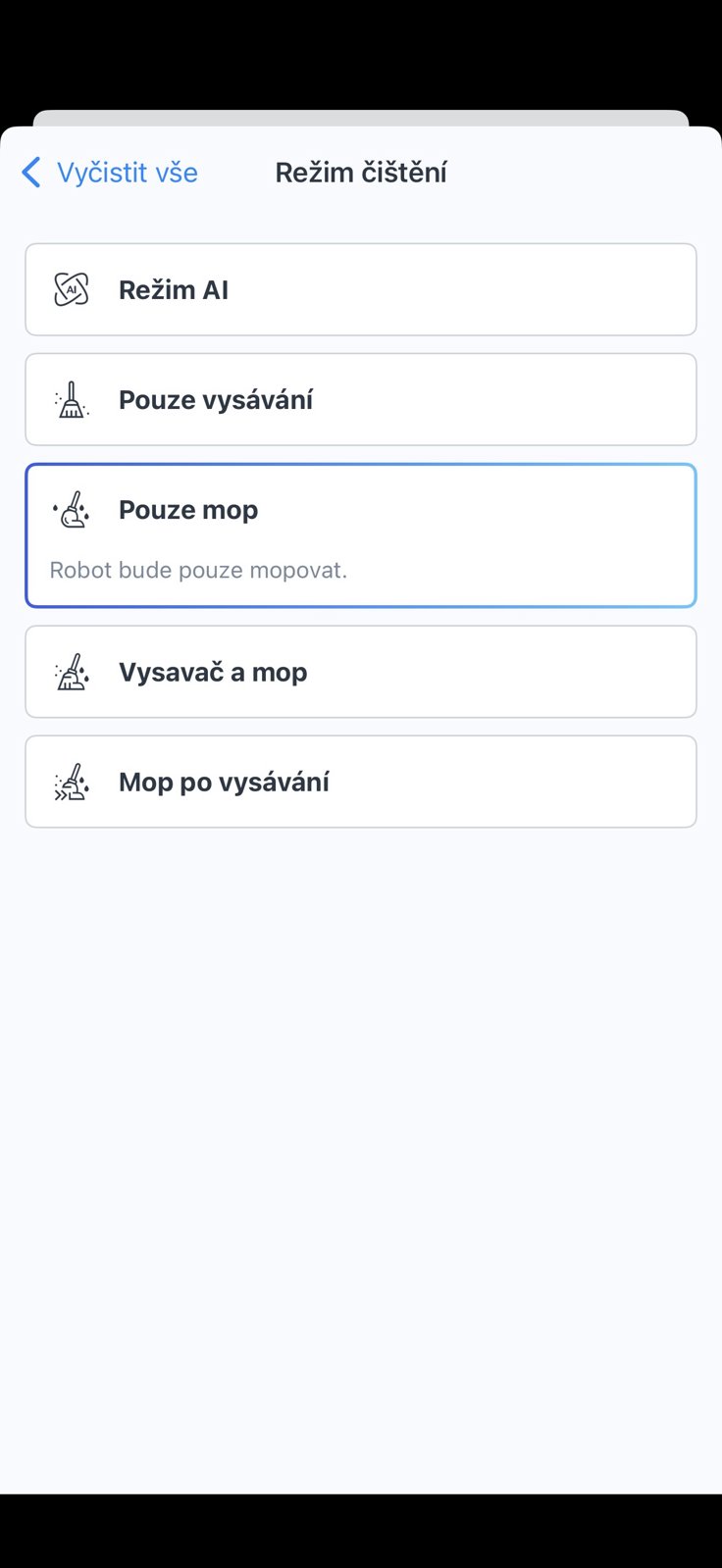
This is my first robot vacuum cleaner and so far I'm satisfied. It combines vacuuming and mopping in one appliance. I appreciate the ability to adjust the suction power and the amount of water for mopping according to current needs. In the mobile app, you can easily select various cleaning modes, such as vacuuming only, mopping only, a combination of both, or even an AI mode. The vacuum cleaner can map individual rooms on its own quite well. I was also pleasantly surprised by the battery life. The vacuum doesn't run out of battery quickly and, compared to my Sencor stick vacuum, it can clean for a long time. The option to set the cleaning intensity (suction power, amount of water for mopping) is also practical. The vacuum communicates in clear English and the mobile app is straightforward. So far, I'm very happy with its features and overall performance, and I definitely don't regret the purchase.
Several cleaning modes (option for just mopping, just vacuuming, or a combination of both)
2 water containers (1 for clean, 2nd for dirty)
Easy to control in the app
Clear mobile app (in Czech) and easy-to-understand voice prompts/messages from the vacuum cleaner in English
Good room mapping
battery life - shown in the app
options to set the amount of water for mopping or the suction power intensity for vacuuming (in the app)
The price might be a bit high for some, but I got it on sale.
long service break when starting up (over 1 minute)
The dimensions of the service station (too big)


0 ×Report
Automatic translation

Ondřej, Znojmo
Rated 10/10/2026, variant Bosch BCRDW3BX Spotless Max Cam
Verified purchase
Setting up the vacuum cleaner was quite simple for me, as we already own other Bosch appliances that I've added to the Home Connect app.
The flat mapping went fine. There were only minor difficulties when editing the map (splitting and moving the boundaries of some rooms wasn't completely straightforward, but I managed it in the end).
The vacuuming and mopping are absolutely fine. It navigates the space very well.
I am completely satisfied.
easy commissioning
Czech localization
easy operation
the mops take longer to dry
0 ×Report
Automatic translation
Anonymous customer
Rated 09/10/2026, variant Bosch BCRDW3BX Spotless Max Cam
Verified purchase
I'm very satisfied with the Bosch BCRDW3BX Spotless Max Cam robot. I was looking for a device that could not only vacuum dust but also mop really well, and this model does it brilliantly.
maintenance-free station
quality vacuuming, even gets into the corners
Higher purchase price, but it corresponds to its features and quality.
0 ×Report
Automatic translation

Josef, České Meziříčí
Rated 08/10/2026, variant Bosch BCRDW3BX Spotless Max Cam
Verified purchase
The best price/performance ratio during Alza Days.
Even though it's very chatty, it doesn't get sidetracked and gets the job done, vacuuming and mopping very well.
All the hair from our Labrador is gone and we're saving money on IKEA lint rollers.
It notifies my mobile, watch or TV that it's working or has finished.
So far it hasn't bumped into anything, fallen anywhere, destroyed anything, got lost anywhere, or broken anything - it simply just cleans.
It manages to clean all the floors in our small house completely without any problems in about half an hour.
All the scheduled start programmes always disappear from the app, it only remembers the first one and customer support don't know what to do about it.
It takes more than two hours for the mop to dry after cleaning – so we don't mop in the evening, only in the morning.
0 ×Report
Automatic translation

Lukáš, Kroměříž
Rated 08/10/2026, variant Bosch BCRDW3BX Spotless Max Cam
Verified purchase
Vacuums and mops well
Long battery life
Even handles dog hair
easy installation
Addictive
0 ×Report
Automatic translation

Libor, Dlouhá Lhota
Rated 07/10/2026, variant Bosch BCRDW3BX Spotless Max Cam
Verified purchase
We bought a new helper for our home – the Bosch Spotless Max Cam robotic vacuum cleaner. We were looking for something that would handle not just the vacuuming for us, but mainly the constant mopping, and this piece of kit promised to take care of everything on its own. After a few weeks of testing, I have to say it's a massive relief, although there's room for a few minor improvements. What pleased me most of all was how easy it was to get the vacuum up and running for the first time. Everything is controlled via the Bosch Home Connect app on your phone, which is entirely in English. Plus, the robot itself speaks to you in English, so when it announces it's starting to clean or that its tank is full, you know what's going on straight away. On its very first run, the vacuum mapped out the whole flat incredibly quickly and surprisingly accurately, without blindly bumping into walls and furniture. The cleaning itself is a symphony. The robot moves around the flat very logically and quickly – it doesn't drive around confused, it just knows where it's already been and where to go next. Thanks to the camera on the front, it sees forgotten slippers, stray cables or the kids' toys and carefully avoids them without chewing them up. But what really got me is the mopping. The vacuum has an extendable mop. When it gets to a wall or into a corner, the mopping pad actually slides out to the side, so it washes the floor right up to the skirting boards. And when it's finished, it drives into its large station where it washes the mops itself with properly hot water, dries them with warm air (so they don't smell of mould afterwards) and empties the dust from itself into a large bag.
Extendable rotating mop (perfect for cleaning along walls and in corners)
High suction power
Fully Czech environment in the Bosch Home Connect app (including voice prompts)
Top-notch sat nav
The charging might be a bit slow, but then again, it saves the battery.
0 ×Report
Automatic translation

Jiří, Pelhřimov
Rated 06/10/2026, variant Bosch BCRDW3BX Spotless Max Cam
Verified purchase
I managed to pair this Bosch vacuum cleaner with my phone in a couple of minutes. We've had a similar vacuum cleaner at home for a month longer, but it's an ETA model, and I still haven't managed to pair that one with my phone.
It doesn't see things that are lower than the camera on the top of the vacuum cleaner. So it constantly bumps into the table legs, which are only a few centimetres high.
0 ×Report
Automatic translation