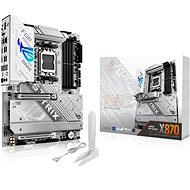
Interested in reviews of ASUS ROG STRIX X870-A GAMING WIFI? It got 4.9 out of 5 stars from our customers. Find specific customer reviews of ASUS ROG STRIX X870-A GAMING WIFI below. We will appreciate if you also share your experiences with ASUS ROG STRIX X870-A GAMING WIFI after purchasing.
Rated 08/01/2025, variant ASUS ROG STRIX X870-A GAMING WIFI
Verified purchase
Perfect board with excellent features and chipset for new processors. Probably the only one from ASUS in all-white. Equipped with AMD Ryzen 7 9800X3D and 32 GB DDR5 RAM. Excellent temperatures and power consumption of the whole assembly, clear and simple BIOS.
Design in white
UEFI BIOS clear and simple even for the layman
Supreme FX sound system
Power cascade and heat sink
RGB logo is programmable
PCIexpress 5.0 for Graphics and M.2 drive
It's not high end, so why does it cost 10k ?
0 ×Report
Automatic translation
Tomáš, Česká lípa
Rated 20/10/2024, variant ASUS ROG STRIX X870-A GAMING WIFI
Verified purchase
I have a 7800x3d and G. SKILL 32GB KIT DDR5 7600MHz CL36 Trident Z5 RGB Black Frames run on AMP profile at first good and full speed 7600mhz! If you enable memory context restore and disable fast boot. So the boot speeds up by about 10sec. Temperatures with ASUS ROG STRIX LC III 360 ARGB WHITE I have around 80 degrees, I expected less. The processor has PBO, CU and 50w power on. On first boot it immediately installs the asus driver software and installs the drivers - but I recommend downloading their software from ryzen and searching for drivers through that. I didn't have to update the bios and everything is stable. Boost FPS over 10600k in cyberpunk by 20fps with the same 4070TI gpu
Amazing look
Lightweight M.2 installation
Great compatibility
Ramek speed
Asus software
I would say higher socket temperatures
The 5.1 sound is stupidly designed, there are only two connectors on the board, the rest you have to put in the front of the case. I don't know who invented it - I'm taking off a star
0 ×Report
Automatic translation
Try our cookies
Alza.cz a. s., Company identification number 27082440, uses cookies to ensure the functionality of the website and with your consent also to personalisage the content of our website. By clicking on the “I understand“ button, you agree to the use of cookies and the transfer of data regarding the behavior on the website for displaying targeted advertising on social networks and advertising networks on other websites.