
AlzaPower Metal USB-C Dock Station 10in1 Dual Screen for Apple MacBook Space-Grey


Gefallen Ihnen die Alternativen nicht?
Wählen Sie aus dem gesamten Angebot
AlzaPower Metal USB-C Dock Station 10in1 Dual Screen for Apple MacBook Space-Grey

Erweitert die Konnektivität Ihres MacBooks oder Notebooks
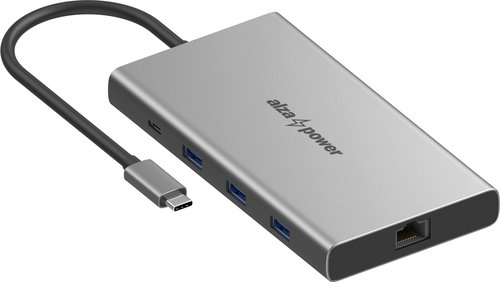
Mit dieser Dockingstation erhalten Sie eine ganze Reihe zusätzlicher Anschlüsse – 2× HDMI 2.0 mit der Möglichkeit, zwei Monitore auch unter macOS anzuschließen, 1× USB-C und 3× USB-A mit einer Übertragungsgeschwindigkeit von bis zu 10 Gb/s, einen SD- und microSD-Kartenleser, 1× RJ45 für eine kabelgebundene Netzwerkverbindung sowie selbstverständlich USB-C zur Stromversorgung des Notebooks mit einer Leistung von bis zu 85 W. AlzaPower Metal ermöglicht es Ihnen somit, die Konnektivität Ihres Notebooks um weitere wichtige Schnittstellen in einem einzigen kompakten Gerät zu erweitern. Schließen Sie sie einfach an einen freien USB-C-Port an und nutzen Sie sofort alle verfügbaren Anschlüsse zum Verbinden von Peripheriegeräten – vonexternen Monitoren bis hin zu schnellen USB-Laufwerken und weiteren Geräten. Um eine optimale Funktionalität und stabile Datenübertragung zu gewährleisten, wird empfohlen, die Dockingstation an eine Stromquelle mit einer Leistung von mindestens 100 W anzuschließen.


bis zu 85 W
Ladeleistung für das Notebook
max. 10 Gb/s
Datenübertragungsgeschwindigkeit
bis zu 2× 4K Ultra HD
HDMI 2.0
74 × 140 × 16 mm
Kompakte AbmessungenUnterstützung von zwei externen Monitoren auch an Ihrem MacBook
Die Dockingstation AlzaPower Metal verfügt über zwei HDMI-2.0-Anschlüsse, mit denen Sie gleichzeitig zwei externe Monitore an Ihr Notebook oder MacBook anschließen und Ihre Arbeitsfläche deutlich erweitern können. Der erste HDMI-Ausgang unterstützt eine Auflösung von bis zu 4K Ultra HD bei 60 Hz, während der zweite 4K bei 30 Hz ermöglicht. Unter Windows können beide Monitore gleichzeitig in der Konfiguration 4K/60 Hz + 4K/30 Hz betrieben werden. Die Unterstützung von zwei externen Monitoren ist auch bei ausgewählten MacBook-Modellen verfügbar, insbesondere bei den Reihen MacBook Pro mit Intel-Prozessoren sowie M1 Pro, M1 Max und M2. Bei Modellen MacBook Air und den Basisversionender MacBooks mit M1- oder M2-Chip wird nativ nur ein externer Monitor unterstützt – wir empfehlen daher, die Kompatibilität des jeweiligen Geräts in der übersichtlichen Tabelle unten zu überprüfen.

Schnelles und sicheres Laden mit Power Delivery 3.0
Die Dockingstation AlzaPower Metal nutzt zur Stromversorgung einen USB-C-Anschluss (female) mit Unterstützung für Power Delivery 3.0 und einer Leistung von bis zu 100 W, wovon 15 W für den Betrieb der Dockingstation verwendet werden, die verbleibenden 85 W stehen für die Stromversorgung des Notebooks zur Verfügung – schließen Sie einfach ein Netzteil oder eine andere Stromquelle mit einer Leistung von mindestens 100 W an. Die Stromversorgung über Power Delivery ist vollkommen sicher – die Dockingstation entnimmt der angeschlossenen Stromquelle nur so viel Energie, wie sie tatsächlich benötigt, wodurch weder Überlastung noch Überhitzung drohen.
Hinweis:
Die meisten Netzteile verfügen nur über 67 W (z. B. die im Lieferumfang von Notebooks enthaltenen), was für einen optimalen Betrieb der Dockingstation nicht ausreichend ist.

Schnelle USB-Ports, Speicherkartenleser und Gigabit Ethernet
Zum Anschluss von Peripheriegeräten wie Maus, Tastatur, Drucker oder externer Festplatte bietet die Dockingstation AlzaPower Metal insgesamt vier USB-Ports. Zur Verfügung stehen zwei USB-A 3.2 Gen 2 mit einer Übertragungsgeschwindigkeit von bis zu 10 Gb/s, ein USB-A 3.2 Gen 1 mit 5 Gb/s sowie ein USB-C 3.2 Gen 2 mit bis zu 10 Gb/s, die einen schnellen Datentransfer gewährleisten und gleichzeitig die Stromversorgung angeschlossener Geräte ermöglichen. Ebenfalls integriert ist ein SD- und microSD-Kartenleser mit der Möglichkeit, beide Karten gleichzeitig zu verwenden, was besonders bei der Arbeit mit Fotos und Videos geschätzt wird. Für eine stabile Netzwerkverbindung steht ein LAN-Anschlussmit Unterstützung von Geschwindigkeiten bis zu 1 Gb/s zur Verfügung – ideal für zuverlässiges Arbeiten und flüssiges Streaming.

AlzaPower Metal überzeugt durch hochwertige Verarbeitung
Die Dockingstation AlzaPower Metal überzeugt durch eine leichte und zugleich äußerst robuste Metallkonstruktion aus einer Aluminiumlegierung. Die kompakten Abmessungen garantieren einen einfachen Transport und sorgen dafür, dass sie auf dem Schreibtisch nur wenig Platz einnimmt. Das Kabel ist mit einer flexiblen PVC-Ummantelung versehen und hat eine Länge von 15 cm. Für die volle Funktionalität der Dockingstation ist die Installation von Treibern erforderlich, der Download-Link ist im Handbuch angegeben.

Go green with Alza
Wir nehmen unsere Arbeit verantwortungsvoll wahr und denken bei allem, was wir tun, an die Natur und daran, wie wir sie schonen können. Anstelle herkömmlicher Kunststoffverpackungen verwenden wir 100 % recycelbare frustration-free Verpackungen. Für den Druck nutzen wir ausschließlich Sojatinte. Go green mit AlzaPower.


Detaillierte Spezifikation der Dockingstation AlzaPower Metal USB-C Dock Station 10v1 Dual Screen, Space Grau
- Elegantes Aluminiumdesign, einschließlich der Anschlüsse
- Flexibles PVC-Kabel mit einer Länge von 15 cm
- 1× USB-C 3.2 Gen 2 (male) zum Anschluss des Notebooks (max. 85 W) mit Unterstützung des DP1.4 Alt Mode; für maximale Bandbreite muss das angeschlossene Gerät DP1.4 unterstützen (dieses Protokoll wird von Notebooks ab dem Jahr 2019 verwendet)
- 1× HDMI 2.0 (1) mit Unterstützung des Videoausgangs max. 4K / 60 Hz, HDR, mehrerer Farbformate (RGB; YCbCr 4:4:4; YCbCr 4:2:2; YCbCr 4:2:0), Farbtiefe 8/10/12 Bit sowie HDCP2.3 und HDCP1.4
- 1× HDMI 2.0 (2) mit Unterstützung einer Auflösung bis zu 3 840 × 2 160 / 30 Hz, Farbformat RGB und Farbtiefe 8 Bit
- Unterstützung von zwei Monitoren (4K/60 Hz (HDMI1) + 4K/30 Hz (HDMI2)) gleichzeitig unter Windows
- Zwei externe Monitore werden auch von MacBook Pro (M1 Pro und M1 Max, 2021 und neuer), MacBook Pro (Intel, 2016–2020) und MacBook Pro (M2, 2022 und neuer) unterstützt
- MacBook Air (M1, 2020), MacBook Pro 13" (M1, 2020) und MacBook Air (M2, 2022 und neuer) unterstützen nativ nur einen externen Monitor
- 2× USB-A 3.2 Gen 2 mit einer maximalen Datenübertragungsrate von 10 Gb/s und Ladeleistung bis zu 7,5 W (5 V / 1,5 A)
- 1× USB-A 3.2 Gen 1 mit einer maximalen Datenübertragungsrate von 5 Gb/s und Ladeleistung bis zu 7,5 W (5 V / 1,5 A)
- 1× USB-C 3.2 Gen 2 (female) mit einer maximalen Datenübertragungsrate von 10 Gb/s und Ladeleistung bis zu 7,5 W (5 V / 1,5 A)
- 1× USB-C PD (female) mit Power Delivery 3.0 (max. 100 W) zur Stromversorgung der Dockingstation; 15 W sind für den Betrieb der Dockingstation reserviert, die verbleibenden 85 W dienen zum Laden des angeschlossenen Geräts; Unterstützung von Fast Role Swap, das angeschlossene Gerät wird beim An- und Abstecken des PD-Adapters nicht getrennt
- SD- und microSD-Kartenleser kompatibel mit Secure Digital v3.0 UHS-I (Ultra High Speed), Geschwindigkeit bis zu 104 Mb/s und gleichzeitige Nutzung beider Slots möglich
- 1× RJ45 mit Geschwindigkeiten bis zu 1 Gb/s sowie Unterstützung von Wake-On-LAN und Duplex Flow Control
- Geeignet für alle Notebooks mit USB-C (Thunderbolt)
- Unterstützung von Samsung DeX (Samsung Galaxy S8 und neuer)
- Kompatibel mit macOS X v10.8 und höher sowie Windows 7 / 8 / 10 / 11
- Für die volle Funktionalität des Geräts ist die Installation von Treibern erforderlich, der Download-Link ist im Handbuch angegeben
- Anschluss an eine Stromquelle mit einer Leistung von mindestens 100 W erforderlich
- Wir empfehlen, die Kompatibilität Ihres Notebooks zu überprüfen, ob es alle Funktionen der Dockingstation unterstützt
| Modell | Mehrere Monitore? | Hinweis |
|---|---|---|
| MacBook Air M1 (2020) | ❌ | 1× extern, 6K@60 Hz |
| MacBook Pro 13" M1 (2020) | ❌ | 1× extern, 6K@60 Hz |
| MacBook Air M2 (2022) | ❌ | 1× extern, 6K@60 Hz |
| MacBook Pro 13" M2 (2022) | ❌ | 1× extern, 6K@60 Hz |
| MacBook Air (Intel, 2018–2020) | ✅ | 2× 4K@60 Hz |
| MacBook Pro (Intel, Touch Bar) | ✅ | bis zu 4 externe |
| MacBook Pro 13″ (M1/M2) | ❌ | nur 1 externer |
| Air/Pro (M1/M2) Pro | ✅ | 2× 6K |
| Air/Pro (M1/M2) Max | ✅ | bis zu 4 externe |
| Air (M3) | ✅ | nur im Clamshell-Modus, 2× externe bei geschlossenem Notebook |
| Pro (M3 Pro/Max) | ✅ | M3 Pro: ≥2, M3 Max: bis zu 4 |
| Air (M4) | ✅ | 2× externe |
| Pro (M4 Pro) | ✅ | 2× externe (6K ggf. 4K/HDMI) |
| Pro (M4 Max) | ✅ | bis zu 4 externe |
Die Produktfamilie AlzaPower
Die Produkte von AlzaPower wurden so entwickelt, dass sie höchsten Standards entsprechen. Auch deshalb können wir die Spitzenqualität jedes einzelnen Produkts garantieren und außergewöhnliche Services anbieten. Im Falle eines Defekts bieten wir Ihnen bei den meisten unserer Produkte einen sofortigen Austausch gegen ein neues Stück an – in allen Filialen.
Spezifikationen
Abmessungen und Gewicht
Laptop-Stromanschluss
Die häufigsten Stecker
Datenanschlüsse - Anzahl und Standards
Stromanschlüsse el. Einrichtungen
Grafikanschlüsse – Anzahl und Standards
Netzwerkports
Eigenschaften
Kompatibilität
| Code: | APWHC54f0 |
| Links: | Herstellerwebsite |
| Hersteller-Info |
Alza.cz a.s., Jankovcova 1522/53, 170 00 Praha 7 - Holešovice, +420 225 340 111, obchod@alza
Mehr anzeigen

|