
Reviews Eternico M500 Wireless black
Interested in reviews of Eternico M500 Wireless black? It got 4.2 out of 5 stars from our customers. Find specific customer reviews of Eternico M500 Wireless black below. We will appreciate if you also share your experiences with Eternico M500 Wireless black after purchasing.
Eternico M500 Wireless black
In stock > 5 pcs
27.90 €
Add to Cart

Radim, Liberec 1
Rated 05/10/2026, variant Eternico M500 Wireless black
Verified purchase
feels very cheap in your hand
0 ×Report
Automatic translation

Jan, Liberec 30
Rated 27/08/2026, variant Eternico M500 Wireless black
Verified purchase
practical side-rolling wheel
Fits well in my hand, I wear a size 9.
light
acts cheaply
0 ×Report
Automatic translation

Vězeňská služba ČR, Žatec
Rated 18/05/2026, variant Eternico M500 Wireless black
Verified purchase - review from a price comparison website
Quality product.
0 ×Report
Automatic translation

František, Strakonice 1
Rated 29/04/2026, variant Eternico M500 Wireless black
Verified purchase
For 400 in discounts + ISIC very nice mouse, however it has a lot of bugs
if you are looking for a cheap alternative to the Logitech MX Master you will probably be satisfied.
It's holding up nicely
price
side wheel that can be repositioned in some programs
BT, 2.4G, USB
Battery life
Except for the wheels, all made of cheap-looking plastic
cheap sensor
no program (inability to reconfigure function buttons)
when changing the DPI, only the side LEDs flash one colour, so you don't know what DPI you have
0 ×Report
Automatic translation

Anonymous customer
Rated 28/04/2026, variant Eternico M500 Wireless black
Verified purchase
For the price excellent mouse, side buttons are more sensitive but I got used to it quickly, no problem for me
Price
Shape and size for larger hand
Metal wheels
USB-C charging
0 ×Report
Automatic translation
Anonymous customer
Rated 26/04/2026, variant Eternico M500 Wireless black
Verified purchase
The first impression was pretty bad, the smooth surface combined with the light weight and minor imperfections in the workmanship gives the impression of something from TEMU. Someone here wrote that it has aluminum wheels, so it doesn't. Nothing but hard plastic. In use, I was struck by the fact that it does not slide very easily on the fabric backing. Nothing terrible, but worse than my old wired A4Tech bloody. The fact that it does not have software is declared in the properties and I do not take it as a negative. Too small side buttons but yes.
On the other hand, the mouse fits well in the hand, the buttons have a quiet press, it doesn't squeak (yet) and the sensor is sufficient. For the price of 560, - not bad. But don't expect an MX Master for a quarter.
ergonomic
a place to store the USB receiver in the mouse
quiet
Quality of workmanship
below average sliders
the surface is easily "clogged"
0 ×Report
Automatic translation

Vladimír, Plzeň 26
Rated 25/03/2026, variant Eternico M500 Wireless black
Verified purchase
well abstain
multi-device settings
scroll wheel to move the tables sideways
I have a bigger hand, it could be a little bigger
0 ×Report
Automatic translation
Anonymous customer
Rated 14/03/2026, variant Eternico M500 Wireless black
Verified purchase
size and layout of buttons
0 ×Report
Automatic translation
Jindřich, Olomouc
Rated 26/02/2026, variant Eternico M500 Wireless black
Verified purchase - review from a price comparison website
It holds well
0 ×Report
Automatic translation

Marek, Orlová 4
Rated 21/02/2026, variant Eternico M500 Wireless black
Verified purchase
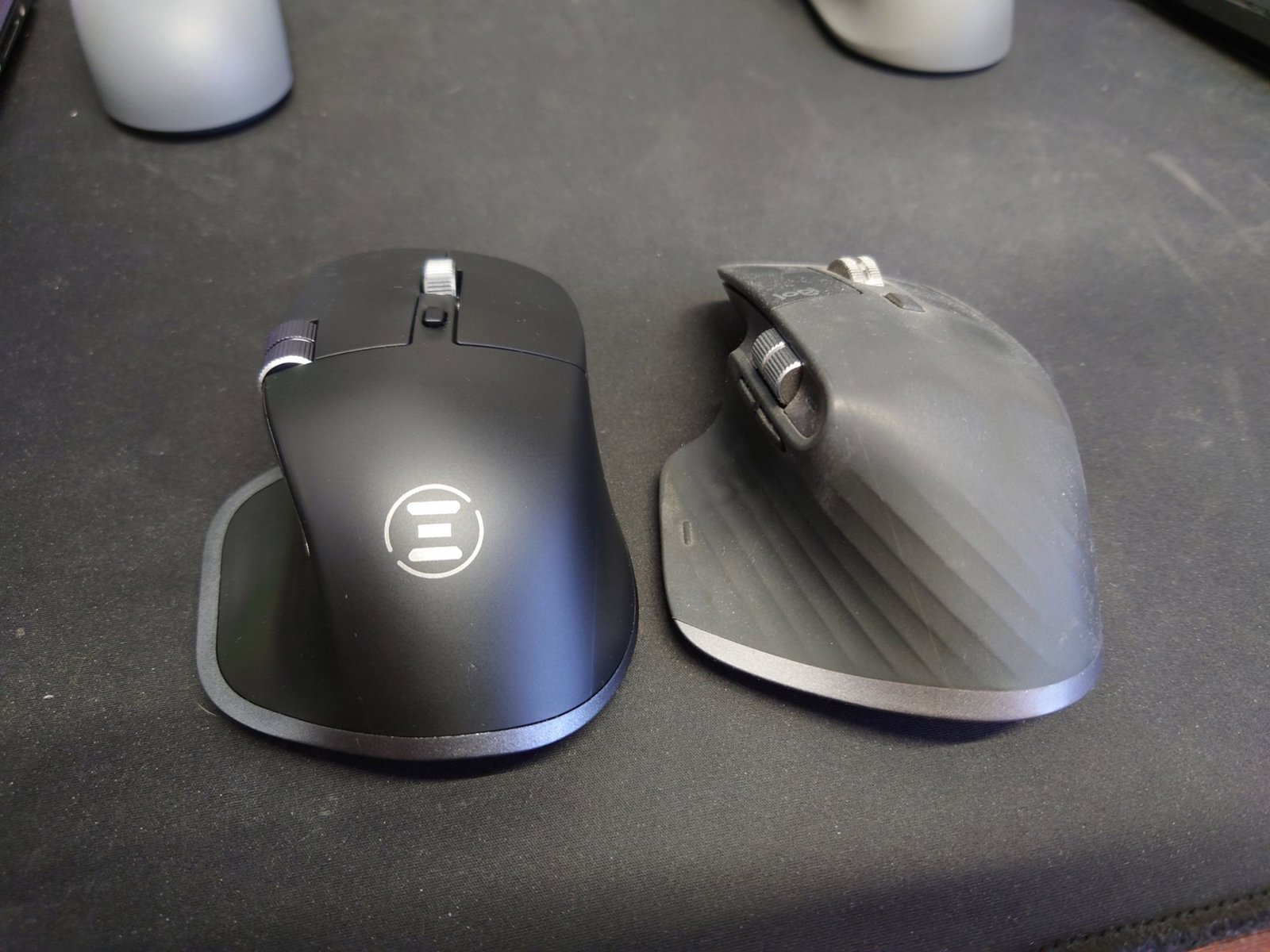
As a former Logitech fan, I was just looking for a replacement for the newly dead MX3S.
I have owned the MX518 since 2003 and it is still functional. The newer G5 somewhere around 2011 started to go wrong with the button after a year or two, but the problems were minor and it lasted until somewhere around 2018, when I was forced to scrap it and go back to the MX518. I purchased the MX3S on sale at a discount in October 2023. It fit my hand well and I was very happy with it. In November 2025 the left button started to go wrong, it couldn't be pulled, it didn't hold and started to skip more and more. The mouse became unusable in December less than 3 months after the warranty expired. The tire on the left had a dent in it after maybe a year. Now after two years and 3 months of use, the rubber is starting to stick to the mouse and would soon fall apart completely. A piece of crap for almost 3k. And now I should get a new MX4 for 3.5k, which will not rot anymore since it is not rubberized, but the buttons will die again and it vibrates nonstop in my hand and it can't even be turned off? If I want my hand to shake nonstop at the computer while I work, I'll borrow my wife's vibrator.
All the regular mice at home are small for me, I have an L hand and the Dell mouse I've been using so far had a son's teflon rusted and it was hard to ride on the fabric pad. Also, the speed was not optimal. To fix the MX3S would cost $14 for a quality button, but I'd have to replace both or 28 and the rubber would rot completely. The MX3S will be shot down by the G34.5 on merit, as that's all the overpriced Logitech stuff deserves and Logitech products are definitely finished for me. So I still have a Logitech KB860, as I'm a fan of ergo keyboards to the wave (MS 4000 CZ from 2005 to 2023), but if it breaks or falls apart, I won't buy anything from Logitech anymore. Now back to the Eternico M500, - I use 2 PCs and 3 NBs and 3 monitors regularly, as an ITak by profession.
Conclusion: Don't waste your money on overpriced Logitech junk, it's pointless. I'll coat this fake MX3S with Talon anti-slip and it will be great for work and hopefully last at least the 5 years: -).
+ the mouse is the perfect size - it's lower than the MX3S, but it fits my hand even better, the MX3S was a bit too tall for L hand
+ low weight - again it suits me, I'm not a gamer
+ the cursor speed is sufficient + the cursor is precise, it does not jump
+ battery indicator shows the state of charge thanks to multiple LEDs
+ price for 7-8 hundreds decent replacement of MX3S except for the extreme smoothness/slipperiness of the surface + for 116 CZK warranty insurance for 5 years - after the MX3S died I have already learned my lesson
+ the buttons are quiet and the click has a good "reset" + the scroll wheel is quiet and scrolls precisely
+ Teflon is high quality and the mouse glides on the same pad as easily as the MX3S
- the plastics and the surface and paint look very cheap at first touch (but still better than Logitech's rotten rubber)
- the mouse is extremely slippery in the hand, it is too smooth - a rougher surface texture is necessary, the rubber would rot again, but perhaps a coating with Alcantara would not be useless
- no software - side buttons cannot be set to Copy/Paste - I have to find a program for Win11 - there is no recommended one
- USB C charging - I'm not a fan of integrated batteries, when they wear out, can't be replaced like an AA battery - AA power would definitely be better for me
- can't buy a standalone USB 2.4 GHz receiver next - mouse has one channel for USB receiver and two BT - need 4 channels - channel switch is on the bottom - annoying - I switch often, should be on top
the side buttons don't click well, especially the one closer to the back of the mouse almost doesn't click

0 ×Report
Automatic translation