
Reviews DJI Neo 2 Fly More Combo (Drone Only)
Interested in reviews of DJI Neo 2 Fly More Combo (Drone Only)? It got 4.8 out of 5 stars from our customers. Find specific customer reviews of DJI Neo 2 Fly More Combo (Drone Only) below. We will appreciate if you also share your experiences with DJI Neo 2 Fly More Combo (Drone Only) after purchasing.
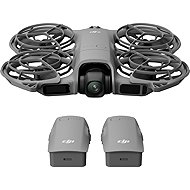
DJI Neo 2 Fly More Combo (Drone Only)
In stock > 5 pcs
339 €
Add to Cart

Pavel, Zlosyň
Rated 20/12/2025, variant DJI Neo 2 Fly More Combo (Drone Only)
Verified purchase - review from a price comparison website
I bought the Neo 2 for my boyfriend for Christmas, but when I found out on YT what it can do, I bought one for myself. Primarily for family and solo trips when you want to pull the drone out for a minute, take a few photos or shots without setting it up and move on. In that respect, Neo 2 is a total game changer. Take it, you'll enjoy it.
easy to control in many ways - via the drone display, voice, gestures, mobile app, controller and goggles
predefined capture shapes, so all you have to do is select them and the drone will execute them
but even the figures can be edited and customized
basic control via the display and buttons on the drone, and then gestures or voice so you don't have to pull out your phone
omnidirectional obstacle sensors - great
on YT there is a video where on 0% battery the drone flew about 500 meters (! )
on the mobile app, I managed to maintain a 240 m connection over the field
according to a few provisional collisions and crashes (yes, microwindows don't even give omnidirectional sensors) it seems pretty durable
besides the mentioned microvets, obstacle avoidance works very well
during flight you can easily hand over gesture control to another person, just by clasping your fingers and the other person showing their palm
The battery starts to signal near discharge after about 13-15 minutes of flight, which seems low, so it could be stronger. (But this is perhaps more important and therefore not a disadvantage: I never worked her to the bone to save her. According to the video mentioned in the Advantages, it seems that it will still have a fairly strong range margin even around full discharge. )
Sometimes it talks too much, typically when you put the drone on your bag or in your lap, it immediately announces the inability to take off. One can live with it, but perhaps in updates they will allow it to be turned off.
Some features, less important to me, are only accessible through the DJI controller, not the mobile app. But I can see that as a business plan, so it's not much of a disadvantage either.
Of course, you can do it manually via the controller or the app, but I miss the option to make the drone take a photo without the pilot in the gesture control. In short, a gesture like "180° turn - take photos 2/5/10 m - fly back".
0 ×Report
Automatic translation