
Reviews CUDY BE11000 2.5G Tri-Band Wi-Fi 7 Mesh Router
Interested in reviews of CUDY BE11000 2.5G Tri-Band Wi-Fi 7 Mesh Router? It got 4.1 out of 5 stars from our customers. Find specific customer reviews of CUDY BE11000 2.5G Tri-Band Wi-Fi 7 Mesh Router below. We will appreciate if you also share your experiences with CUDY BE11000 2.5G Tri-Band Wi-Fi 7 Mesh Router after purchasing.
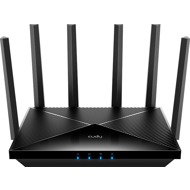
CUDY BE11000 2.5G Tri-Band Wi-Fi 7 Mesh Router
In stock > 5 pcs
129.90 €
Add to Cart

Jana, Hlohovec
Rated 21/02/2026, variant CUDY BE11000 2.5G Tri-Band Wi-Fi 7 Mesh Router
Verified purchase
Cant connect 2 router as mesh.
no mesh with same router. you need to buy mesh unit.
0 ×Report

Petr, Sviadnov
Rated 12/02/2026, variant CUDY BE11000 2.5G Tri-Band Wi-Fi 7 Mesh Router
Verified purchase
that there were problems connecting devices at higher encryption at the beginning, but this was solved by a firmware upgrade
the device accelerated the internet in the house by 25%
nothing
0 ×Report
Automatic translation
Anonymous customer
Rated 24/12/2025, variant CUDY BE11000 2.5G Tri-Band Wi-Fi 7 Mesh Router
Verified purchase
I bought the router for my home with the new O2 internet 500 Mbps (VDSL bonding) and the expected upgrade to fiber optics. I use two in the mesh to cover a larger old family home. There is normal traffic on the network - a few PCs, phones, laptops and a few smart home elements (cameras, smart home), there should be a home server, but it is not yet in an active state. Although it is supposed to be a model with high transfer speeds and excellent port connectivity, I have had a problem with routers practically from the beginning, WiFi outages (I didn't know until now), devices refusing to connect, etc. Analysis of the system logs confirmed that the device was reaching maximum operating temperatures (level 4 and 5), to which it responded by disconnecting clients and drastically reducing Wi-Fi throughput. The firmware seems to be out of tune - it keeps generating errors in the IPv6 configuration, which puts further load on the processor. For someone looking for a stable network foundation and planning to use the 2.5G ports to their full potential, this device is unusable in its current state. I'm returning within 14 days and recommend looking for models with better cooling. examples of errors:
Wed Dec 24 03:09:59 2025 kern. warn kernel: [ 105.776269] Thermal level for wifi0 is 5 Wed Dec 24 03:10:14 2025 kern. warn kernel: [ 120.776241] Thermal level for wifi0 is 4 Wed Dec 24 03:13:58 2025 kern. Kernel info: [ 344.200164] wifi0: [E2:47: C4: A0:6E: EB] station kicked out due to excessive retries Wed Dec 24 13:06:56 2025 daemon. hostapd info: ath11: STA 1c:90: ff: c1: a5:2b IEEE 802.11: disassociated Wed Dec 24 13:15:54 2025 daemon. warn odhcpd[5491]: A default route is present but there is no public prefix on lan thus we don't announce a default route! Wed Dec 24 03:08:14 2025 kern. err kernel: [ 0.435728] bdinfo: __bdinfo_read(542)read from bdinfo failed Wed Dec 24 03:08:18 2025 user. notice root: /usr/sbin/ethtool: not found
Top paper specs (Wi-Fi 7, AX11000, 2.5G ports)
Advanced Qualcomm chipset and mesh support
Quick setup and support for specific functions
Truncated OpenWRT system
Severe overheating: Even in December at room temperature and minimum load, the system reports a critical thermal level (Thermal level 5), which leads to power limitation
Unstable Wi-Fi: Due to temperatures, the router disconnects devices (phones, IoT) and rejects new connections
Firmware bugs: System logs are overwhelmed with error messages (IPv6 loops, missing system binaries), which unnecessarily overloads the CPU
Absence of USB: The router does not have a USB port, so you can't even easily power additional cooling
0 ×Report
Automatic translation

Pavol, Zvole
Rated 16/12/2025, variant CUDY BE11000 2.5G Tri-Band Wi-Fi 7 Mesh Router
Verified purchase
Satisfied, the signal range is very good, only a pity that I do not have removable antennas (error in the description)
Signal
Wifi 7
Qualcomm
Price
Antennas fixed only
0 ×Report
Automatic translation

David, Litoměřice
Rated 23/07/2025, variant CUDY BE11000 2.5G Tri-Band Wi-Fi 7 Mesh Router
Verified purchase
4x 2.5GbE (1 connector occupies WAN)
all WIFI standards incl. WIFI 7 at 6 GHz
Simple and fully functional WireGuard (the fastest free VPN)
So far the strongest WIFI signal I've had with the router
Very simple/clear menu
definitely low price against any competition (try to find a router with the above pros)
menu in English is sometimes rather funny translated (I solved it by switching to ENG). Still, one can understand
the power adapter has a short cable with a connector. I solved it by leaving the adapter from TP-Link router with the same parameters
I purchased MESH satellites (M3600/BE3600) for the router, which cannot be connected wirelessly. You will not create a MESH network. This can be created by connecting a LAN cable to the satellite and at that moment a MESH network/room is created with this router. It seemed to me more a firmware problem than a satellite problem. Once you disconnect the LAN cable, the satellite itself does not work.
0 ×Report
Automatic translation

Václav, Ústí nad Labem 10
Rated 26/06/2025, variant CUDY BE11000 2.5G Tri-Band Wi-Fi 7 Mesh Router
Verified purchase
It serves quite well, although it is a "pure Chinese", so it is of course advisable to be a bit more supervised about its outward behavior and to disable everything that is not needed (for example UPnP, external ping, etc. ). But otherwise probably OK, especially thanks to the 6GHz band.
tri-band wifi
WiFi 7
there could be more detailed settings
OpenWRT firmware is not yet available
0 ×Report
Automatic translation