
Reviews Canon i-SENSYS MF657Cdw
Interested in reviews of Canon i-SENSYS MF657Cdw? It got 4.3 out of 5 stars from our customers. Find specific customer reviews of Canon i-SENSYS MF657Cdw below. We will appreciate if you also share your experiences with Canon i-SENSYS MF657Cdw after purchasing.
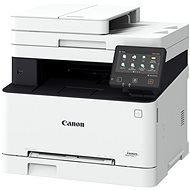
Canon i-SENSYS MF657Cdw
Discontinued

Petr, Ostrava
Rated 19/10/2025, variant Canon i-SENSYS MF657Cdw
Verified purchase
I do not recommend the acquisition.
We have been using the product for about 6 months. Nice appearance can be praised. We're constantly having trouble with the scanner. Whatever the print quality is, very often we deal with when scanning outside the paper area, i.e., part of the text is out of bounds. For me, the product cannot be recommended in any case.
Nice design
constant problems with the scanner
0 ×Report
Automatic translation

Zdeněk, Praha
Rated 25/02/2025, variant Canon i-SENSYS MF657Cdw
Verified purchase
If you are having trouble installing the drivers and the printer is disconnecting, you need to switch the USB port mode from the default UFR II to PCL6. You do this on the printer's touchscreen. It will ask you to log in, the default ID and PIN are 7654321. The changes will take effect when the printer is switched off and on. With the USB cable disconnected, uninstall the Canon drivers, remove any non-functioning copies of the printer in the Printers and Scanners window, restart and begin installing the Canon drivers, and connect the USB to the printer when prompted by the installer.
High quality image output
Quality scans
Can be used with PC or standalone
When printing from Windows, the printer wakes up from power saving mode, but after a long time it shuts down completely. If you want it to always be ready, it can be disabled in the settings, either on the touchscreen or via the web interface.
Does not go through USB cable by default (Windows 11 24H2)
You must not connect the USB until you have installed the drivers. If this has already happened by mistake, this will help: In the Device Manager window, select View Hidden Devices, then USB Controllers > USB Print Support, uninstall, disconnect the printer's USB cable, restart the PC and run the Canon installer.
The scanner does not go into power saving mode, the machine does not wake up, you have to press the moon symbol under the printer display, then you can scan in Windows.
0 ×Report
Automatic translation

Customer, Klatovy Klatovy IV
Rated 06/12/2024, variant Canon i-SENSYS MF657Cdw
Verified purchase
Good communication, speed of delivery
0 ×Report
Automatic translation

Antonín, Jestřabí Lhota
Rated 16/11/2024, variant Canon i-SENSYS MF657Cdw
Verified purchase
Duplex printing and scanning
More complex first setup and start-up
0 ×Report
Automatic translation
Petr, Lipník nad Bečvou
Rated 02/09/2024, variant Canon i-SENSYS MF657Cdw
Verified purchase
I am evaluating the printer after about a month of use and so far no problem; the first setup of the printer took place in minutes without a cable (just connect to the home network), you just need to install the drivers from the supplied CD or download on canon.cz - I installed on several PCs and also without a problem
easy first setup
fully wireless connection
what I needed, I got
seamless printing from your mobile phone (iPhone)
0 ×Report
Automatic translation
Miroslav, Plzeň 26
Rated 09/08/2024, variant Canon i-SENSYS MF657Cdw
Verified purchase - review from a price comparison website
Two thick manuals (installation and safety instructions) supplied with the printer. In fact, it is only 6 and 4 pages in Czech, the rest is a translation into another 29 languages. If you don' t need a fax, look for the MF655Cdw. There is also the MF651Cw, but it cannot do duplex printing. The supplied DVD disc with drivers has not been used, it' s a shame that manufacturers don' t keep up with the times and don' t put drivers on a USB flash drive. The default printer management account ID and PIN are listed in the web user manual under Settings -> Main Features. Open the QR link from the Setup Guide cover.
Tried the Canon PRINT app for printing from mobile/android, it works on the first try (version 7/2024).
The printer does not communicate when trying to print via USB, it helped to delete the USB port of the previous old printer. It may not be a product problem.
0 ×Report
Automatic translation
Ing. Petros Michailidis, Petrovice u Karviné
Rated 24/04/2024, variant Canon i-SENSYS MF657Cdw
Verified purchase - review from a price comparison website
It meets all the parameters I asked for. And I'm not a simple user, I must point out.
double-sided everything (print and scan)
fast scanning of a "stack" of documents
It's heavy.
0 ×Report
Automatic translation

Jan, Bradlec
Rated 19/04/2024, variant Canon i-SENSYS MF657Cdw
Verified purchase - review from a price comparison website
It prints, copies and scans well, I hope it lasts, it's my second Canon MF printer and I've always been happy with it
It has all the features I have asked for in a networked multifunction machine for the home office
The installation is not as complicated as some describe, I just need to choose what I want to install on the Canon website and then just download the necessary files and install as instructed. Install the entire driver package or you will miss the scanner driver.
Although it is not customary nowadays, I recommend reading the detailed instructions before installation and use, it is on the web and in Czech. Or at least the topics from it that you are currently addressing.
It can also help to insert the included CD into the drive (if you have one) and be guided to the detailed manual, where you will learn all the settings and how to use it
This is a fairly advanced device, so you need to give it some time and energy in the beginning to make it last long and serve well
I would have liked the control panel to be able to rotate sideways and have a bit more touch sensitivity, but it's still usable
0 ×Report
Automatic translation
Jiří, Uherský Ostroh
Rated 15/04/2024, variant Canon i-SENSYS MF657Cdw
Verified purchase
Printing within five minutes of plugging in, all set directly on the printer display, fine-tuned later via the browser.
Very intuitive setup
Print quality
Print speed
0 ×Report
Automatic translation
Jan, Ostrava
Rated 30/12/2023, variant Canon i-SENSYS MF657Cdw
Verified purchase - review from a price comparison website
So far we have only tried printing from PC, android and ios airprint. Everything's fine. We'll see how the scan goes.
0 ×Report
Automatic translation