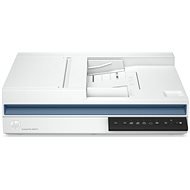
This page contains frequently asked questions about HP ScanJet Pro 2600 f1 Flatbed Scanner. If you are considering buying this product, you may want to read the discussion or ask more questions about HP ScanJet Pro 2600 f1 Flatbed Scanner. They will be answered by our specialists.
Hallo, kann dieses Gerät scan2Sharepoint365? oder scan2smb? lg
Alza Expert,30. 3. 2025
Guten Tag,
vielen Dank für Ihre Anfrage.
Der HP ScanJet Pro 2600 f1 ermöglicht das direkte Scannen zu SharePoint Online (Office 365) mithilfe der HP Scan-Software. Nach dem Laden des Originals und dem Öffnen der HP Scan-Software können Sie die Option "Speichern als PDF" wählen und den Speicherort auf Ihrem SharePoint-Laufwerk festlegen. Detaillierte Anweisungen finden Sie im HP Support-Dokument.?
Bezüglich des Scannens zu SMB (Scan-to-File) bietet der Scanner Unterstützung für WIA, ISIS und TWAIN. Dies ermöglicht das Scannen direkt in Dokumentenanwendungen. Für die Einrichtung von Scan-to-SMB sollten Sie die Anleitungen in der Benutzeranleitung konsultieren oder sich an den HP Support wenden.?
Mit freundlichen Grüßen
Alza.cz a. s., Company identification number 27082440, use cookies and other data to ensure the proper functioning of the website and, with your consent, also, among other things, to personalize advertising and the content of our websites. By clicking on the “I understand“ button, you agree to the use of cookies and the transfer of data regarding the behavior on the website for displaying targeted advertising on social networks and advertising networks on other websites.